Showing posts with label Know-How. Show all posts

How to Make Free Bitcoin Daily

It is called startMiner; an industry leading Bitcoin mining pool. All of the mining powers are backed up by physical miners. Mining with the latest algorithms allows you to make as much Bitcoin as possible. It provides you with the easiest possible way to make money without having to invest a dime or do any of the hard stuff. Note that it is not a ponzi.
With data centers around the globe, it aims to keep bills down and mining power high, meaning you can make more in a shorter amount of time than what it would take to mine from your home for instance. Its data centers are located in Europe, USA and China with dedicated Up-Links and 99% uptime! 


The website is secured with SSL certificate and it looks very matured to be trusted. 
Remember, you don't have to invest a dime before you start earning. All you do is just log in with your bit coin wallet address on daily basis and see your earnings grow. Click on this link https://www.startminer.com/454614 to get your account created if you are interested. In case you don't have a Bitcoin wallet address, click on this link https://blockchain.info/ to create a Bitcoin wallet account for free and get your unique address.
Note that I have not made any withdrawal because I have not earned the required amount of coins eligible for withdrawal but my earnings are already growing, meaning I may soon withdraw.
Read More »

Few Steps to Create JAMB Profile

The Joint Admission and Matriculation Board (JAMB) is the body that is charged with the responsibility of accepting application for admission and issuing same to undergraduate admissions applicants into Nigerian universities, colleges and polytechnics. According to the latest update by JAMB, it is now mandatory for all candidates to create Profile on the Jamb website before they can participate in the 2017 UTME.

Get $25 instantly just for creating a Payoneer Account. Click on this link to Sign Up

When an applicant creates a profile on JAMB portal, it enables him to check his Jamb result when it is out, print out his result, admission letter, etc.
Steps below shows how to create a profile on the JAMB portal before a full application is made.
Step One: Click here to visit the official portal of Jamb.
Step Two: When the page opens, enter your functional email address and other details and click on verify email. Note that your email could be Gmail, Yahoo mail or others.
Step Three: Login into your email and click on the link sent to you by JAMB so you confirm it and continue your registration. In case you do not see it on your inbox, check your email spam folder. If you don’t see it in your spam box, wait for a little time and it will come. In the registration process, be sure you enter your correct information such as name, date of birth, place of birth, etc.
After you are done, you can login with your details to view your profile and complete your registration.
Good luck!


Read More »

Steps for Doing Backup or Restoring Your Blogger Blog Template

Blogger templates are XML templates and they are in variety of tones. While you may get so many of them on the internet for free, there are some that you have to pay a token before you may have them. If you are skilled in blog design and coding, you will be able to manipulate these templates to suit your interest.
Get $25 instantly just for creating a Payoneer Account. Click on this link to Sign Up

It is always advisable that you do a backup of your templates before you make any change on your blog; irrespective of how skillful you are in coding and manipulations. Doing a backup allows you to restore the earlier template thereby bringing back the look of your blog to its former state in case anything goes wrong in the process of making changes.

The backup process is a very simple on and can be done with two minutes

In this step by step tutorial, I will show the entire processes from backing up your template to restoring same.
How You Can Backup  Your Blogger Blog Template
Backing up your blogger blog template helps you save a copy of your template so you may restore it back to its earlier state in case you mistakenly destabilize it in the process of editing your blogger blog interface.
On a serious note, you are advised to always backup your template whenever you want to make any change - add or remove anything on your template current
In this tutorial I will show you a step by step procedure on how you can successfully backup your blog template each time you want to make any change on your blog.
Please follow the instructions bellow very carefully:
Step one: Login to your blogger blog account, and locate the Template area of your blog in your blogger blog dashboard.
See the screenshot below.
Step two: Click on the "Backup/Restore" button at the right top of the page in your dashboard as you can see in the screenshot below.
Step three: Once you have clicked on the “Backup / Restore” button, you will see a popup with an option to download the current template. Just click on that button to get it downloaded and save on your computer for use in case anything goes wrong while making changes.
How You Can Restore the Blogger Template from a Previous Backup
Just like I said earlier, the reason why you should backup your blogger blog template is to use it again in case something may not work as you want after you have made changes on your blog. If after making changes and you are not satisfied with the look of your blog, or something such as a widget is not functioning proper because you have tempered with a particular HTML code, what you do is to re-install a copy of the template you have saved on your computer as a backup, so you can restore (bring back) your blog to its earlier state.
The steps below will guide you on getting that done
Step one:  just like the same processes I explained above, login to your blogger account and locate the Template section in your blogger blog dashboard, just as shown in the screenshot below.
Step two: Click on the "Backup/Restore" button on the right top of the page as you can see in the screenshot below.
 Step three: You will see a popup with an option to upload a template from your hard drive. See screenshot below.
Now select the backup XML file saved on your computer, which you downloaded earlier. Once you have selected it you will see the name you saved it with beside the “Choose a File” button. Click on the “Upload” button below the “Choose a File” button and your template will be uploaded and activated. See screenshot below.

Once the upload is complete, your old template should be back in action.

Read More »

Get the Access Bank Mobile Money Transfer Codes

Today I will be talking on how you can transfer money to people in Nigeria using the Access Bank mobile money transfer code. With the code you can transfer money to Access Bank account holders as well as other people that do not maintain account with Access Bank but with other commercial banks in Nigeria.

Get $25 instantly just for creating a Payoneer Account. Click on this link to Sign Up

Access Bank Plc, one of the commercial banks in Nigeria; owned by Access Bank Group is licensed by the Central Bank of Nigeria to operate as a commercial bank within Nigeria.
Access bank offers Unstructured Supplementary Service Data (USSD) transfer codes that one can dial on a mobile phone anytime the person wants to effect a mobile money transfer from his Access bank account to any bank account in Nigeria. With this kind of service, an account holder in the bank needs not visit any Access bank branch or nearest Automated Teller Machine (ATM) before sending money to others.


Easy Steps to Making Your Transfer:
If you want to transfer to an access bank, just dial *901*1*AMOUNT*NUBAN Account Number # 
For example; *901*1*1000*1234567890# from your phone number, then authenticate with the last four digits of your BVN.
To transfer to other banks, dial *901*2*AMOUNT*NUBAN Account Number # 
For example; *901*2*1000*1234567890# from your phone. Then authenticate with the last four digits of your BVN.
Good luck!


Read More »

GT Bank Now Helps You Save Money for a Purpose via Target Account

Credit: GT Bank

The GuarantyTrust Bank Target is a platform through which you can save money automatically. It is a new innovation by Guaranty Trust Bank Plc. which encourages financial discipline through savings. The new innovative product is purposely designed to enable its customers save for a purpose with a certain target, such as: higher education, purchase of new car, building a new house, wedding, holiday, etc. Whatever your goal could be financially, the Guaranty Trust Bank Target is there to help you make it a reality.

Get $25 instantly just for creating a Payoneer Account. Click on this link to Sign Up


As soon as you have signed up for the Guaranty Trust Bank Target account, you can go ahead to set up standing instruction orders to funding your Guaranty Trust Bank Target account at your desired pace. Note that Guaranty Trust Bank Plc. will require that you provide the account which will be debited for the standing instruction orders you have given, the exact amount to be debited in the account you have provided, the frequency at which debit shall be made, for instance; (thirty days, three months, six months, etc.), the start date for debit and end date for same.

Credit: Tech for Luddites
For instance, if you want to have Nine Hundred Thousand Naira (N900,000) in six months, you can give Guaranty Trust Bank a standing order to have One Hundred and Fifty Thousand Naira (N150,000) automatically transferred from your Guaranty Trust Bank savings or current account to your Guaranty Trust Bank Target account at a certain time every month for the period of six months.
The question now is; what do you plan to save for? Is it for your higher education, house, Bugatti car, Apple laptop, or what? All you need do is place a standing order to Guaranty Trust Bank to make regular, fixed payments from your savings or current account to your GT Bank Target account.
Note that each time you wish to withdraw from your Guaranty Trust Bank Target account for the purpose you are saving, you can transfer the actual amount you wish to withdraw to your Savings or current account so you may withdraw the money either at the banking hall, at the ATM or use it for online transactions on the internet.

Seven Things the Guaranty Trust Bank Target Account Can Offer

  1. It offers you a minimum savings period of six months
  2. It is a non-transactional account
  3. You have zero account opening balance
  4. You can make standing order at a frequency of monthly, quarterly or semi-annually
  5. You can make mandatory standing order of Five Thousand Naira (N5, 000) minimum 
  6. You can open maximum of three sub accounts for different financial goals and targets
  7. You can open the account on Guaranty Trust Bank internet banking platform or by walking into any branch of the bank nationwide.

Steps to Opening Guaranty Trust Bank Target Account on the Internet Banking Platform of the Bank

  1.  Log in to the Guaranty Trust Bank Internet Banking Platform
  2. Click on "Self Service" on the side menu.
  3. Click on "GT Target Account" and follow the instructions.
  4. Guaranty Trust Bank Target Account number will be generated for you automatically.
  5. Thereafter, proceed to place your standing order instruction.

Congratulations! You are done with account opening.

Read More »

What You should know about Masturbation


This is a guest post by Opeyemi Odunayo, a guest writer on Knowledge Blog.
Masturbation is the act of stimulating one's sex organs (the penis in men and clitoris in women) to evoke sexual pleasure which culminates in an orgasm. 
The act of masturbation is as old as mankind. While there are so many myths about masturbation which you may have come across, here are some facts, backed by medical research, you should know about it.
1. Minor penile skin ulcers 
It's rare, but studies have shown that occasional and rough masturbation can lead to minor penile skin ulcers, which can be painful and even become infected.

2. Research has shown that the composition of semen ejaculated during masturbation is different from that of sexual intercourse, meaning that prostate cancer-preventing function of sexual intercourse may be lacking in masturbation. 

3. Masturbation can become a compulsion that can affect one's sex life such that one may be unattracted to sex with a partner. This occurs when one is hooked exclusively to masturbation as the only means of sexual gratification, or when the intense pressure of porn and masturbation can't be reached with one's partner. 

However, there's also medical evidence that masturbation

4. Boosts immunity and mood
Like sexual intercourse, the orgasm at masturbation releases the hormone cortisol which plays a role in regulating the body's immune system. It also releases chemicals such as dopamine and oxytocin which are responsible for good mood and a sense of gratification.

5. Makes one last longer 
Regular masturbation can help one last longer during sexual intercourse. Subsequently, masturbation indirectly contributes to a better sex life in a relationship.

If you do masturbate, and feel it's affecting your life in any way, especially your sex life, you should see a sex therapist for counselling. However, if you're good with it and every aspect of your life is perfectly fine, there's nothing wrong with the act of masturbation. 


Read More »

The Idea of Ecooperative Money Making System Explained

When you join the ecooperative with just One Thousand Naira (N1,000), you are sure of getting GUARANTEED Help of over Two Hundred Thousand Naira (N200,000) within thirty days.
http://ecooperative.online/register/successminds
E-COOPERATIVE is a peer to peer program that makes you money  even while you are asleep.
It is a peer to peer payment platform where you pay others and others pay you as well. Admins assign team members under each other in an orderly fashion to maximize payout potentials of e-cooperative.
*1ST STAGE
In summary:
level1 = 4
level2 = 16
level3 = 64
level4 = 256
Upgrading fee on each level
level 1= N1,000
level 2= N2,500
level 3= N5,000
level 4= N10,000
Your income on each level
level 1= 4k
level 2= 40k
level 3= 320k
level 4= 2,560,000
WHEN DO WE START?
WE START NOW, FIRST COME FIRST FIX BASIS
To enjoy from my spillover refers join now, my reserved five down-liners will be placed in your matrix.
Congratulations in advance!
Note: - Money is directly paid into members' bank accounts by members.
PLEASE NOTE THIS: ENSURE YOU HAVE YOUR N1,000 READY AND PAY IMMEDIATELY YOU REGISTER. MOBILE TRANSFER IS ALLOWED.
YOU HAVE JUST 72 Hours to make payment so your account may be activated, failure to do so will make your account get deleted. To Upgrade to Level 1 With N1,000 Only, you can use Internet Banking Transfer, ATM Transfer or Mobile Banking Transfer.
Register now via this link and notify me after registration so I will assign myndownliners under you for faster upgrade to the next levels. 
Note, I have only five down-liners that will be assigned under you as soon as you register, so act faster!

http://ecooperative.online/register/successminds
Regards,
SuccessMinds
Read More »

Clean up Your Computer Components and Peripherals

Dirt represents the biggest hazard for your computer’s components and peripherals. In order to prevent overheating and dust build-up, you need to clean all of your computer elements on a regular basis. Although most people feel reluctant when they need to unscrew and open their computer case, you’ll be happy to find out that the whole cleaning process can be done in less than 30 minutes and you don’t need to remove RAM or video card while doing it.

How often you should clean your unit?

This depends on many different factors. These are some of the things that determine dirt buildup around your computer’s components and peripherals:
  1. Computer placement- Desktop computers that are placed on the floor attract more dust, hair and carpet particles;
  2. Smoking or nonsmoking room- Smoking around your computer increases ash and chemical build-up inside the case;
  3. Pet friendly room- Desktop computer owners with pets, usually find much more hair and shredded fur inside the CPU fan and need to clean their computers more frequently;
  4. Couch (computer) potato(-ism)- People who spend a lot of time in front of their machines and tend to eat and drink while playing their favorite games or browsing the internet can find food and drink leftovers in-between keys or inside the case.

Tools

Computer cleaning can be done with a wide variety of different tools. You should gather the whole cleaning tool set before you open your case. This tool set should include:
  1. Small-caliber screwdriver set- to open the case and disassemble and reassemble components and peripherals;
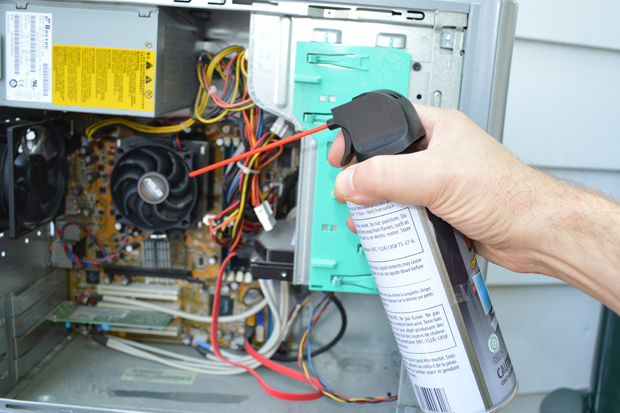
  2. Can of compressed air or small vacuum cleaner- to blow off the dust;
  3. Camera or smartphone- to take photos of the placement of computer parts and of the cable scheme (or to ask Google for help);
  4. Small paint  or tooth brush- for places that can’t be reached by compressed air;
  5. Cotton swab and alcohol- for delicate cleaning;
  6. Thermal paste- to protect the processor and fan from extensive heat;
  7. Microfiber cloth and glass cleaner- to clean the monitor;
  8. Zip ties- to hold and arrange cables after the cleaning is done;

Cleaning process

Before you open your computer case or any peripheral unit, you need to make sure that all power cables are disconnected. Start with cleaning your peripherals.

Keyboard

Before you start, take a photo of the keyboard, in case you forget the key scheme. Remove each key and clean it thoroughly with cotton swab and alcohol. For surface under the keys you can use a small vacuum cleaner or a can of compressed air.

Printer

repair.png
Image source: http://toledoprinterrepair.net//wp-content/uploads/2012/09/repair.png
Dirty printer head often causes printing problems. You need to clean it with alcohol or with a product specially designed for printer head cleaning. You should also clean printer rollers, which will eliminate further paper jam issues. Also, don’t forget to clean the ribbon and stabilizer bar. Area around toner cartridges should also be cleaned. You can use this opportunity to refill printing cartridges, but remember to always use an appropriate ink for this purpose. So, if you use Ricoh printer, fill cartridges with original Ricoh ink. For HP, always choose branded HP refills, and so on.

Computer screen

Apply glass or specialized screen cleaner on microfiber cloth and clean the monitor with gentle circular moves. In the end, wipe the monitor with a dry cloth in order to remove excess moisture.

Opening computer cabinet

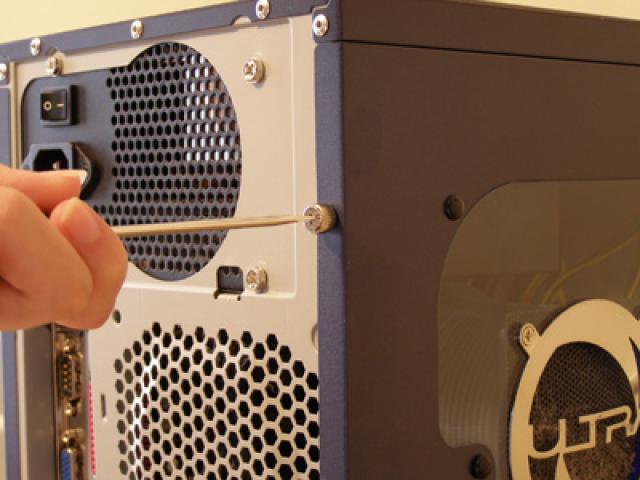
Computer cabinet should be opened with a screwdriver. Most desktop computers can be opened with 6-32 screwdrivers, while for some cabinets you will need an M3. Screws are usually on the back of the case. When you open the case, blow off the dust with compressed air, and then start disconnecting and unscrewing each computer component. Don’t forget to take a photo of your computer’s scheme and fold all the cables to make reconnecting them easier.

Fan

Fan is the first thing you should clean. You can clean it with compressed air, just make sure not to blow fan dust back to your computer cabinet. To clean the fan thoroughly, you need to unscrew it and clean it with cotton swab soaked in alcohol (some people use damp tooth brush for this task). When you’re reinstalling your fan, watch out for the sign that indicates which way the air is being pushed into the computer case.

Mother board

If you want to clean your motherboard just a bit, you should use compressed air can and simply blow off the dust. But, if you want your motherboard to be fully cleaned and shiny, remove each element from it (CPU, cards, RAM etc.) and clean it with a cotton swab. This kind of motherboard spring cleaning can be done once a year, and it will solve all of your mother board, CPU, RAM and GPU dust issues.

Processor

CPUs are wrapped in thermal paste in most computers, and there are two ways to clean them. You can simply blow the dust and thermal paste’s residual material off with a can of compressed air, or you can unscrew the processor and thoroughly clean its heatsink with alcohol applied on a cotton swab. Second option will leave you with a spotless processor, but you will need to apply a new layer of thermal paste, before attaching it back to the motherboard.

Desktop spring cleaning is very useful, not only for removing dust from your computer’s components, but also for conducting on the spot diagnostics that will determine which components and parts are ready for a refresh or a change. You should also use this opportunity to arrange your cables with zip ties, which will make your next computer cleaning much easier.

This article was written by Raul Harman, a KnowledgeBlog.Net Contributor; a Tech Geek and an Editor of Technivorz.
You can send us your tech related articles for publishing to attamah@knowledgeblog.net, and it will be published under Guest Posts. You can also send us Sponsored Posts for publishing via same email ID attamah@knowledgeblog.net. 
Read More »

Get Best Blogging Advice Here

You may have some familiarity with blogging already. Blogs are webpages composed for the purpose of getting your message out about life or the things you love doing with it. Blogs are more personal to people than a webpage and are one of the most popular forms of social media. Read on for some excellent information if you have an interest in blogging. If you are interested in blogging, but you don't particularly like to write, try starting a blog about one of your creative talents. You could try a photography blog and share your hobby with others. Or you may write poetry or music that you could post samples of. If people like what you have to offer, they will come back for more.

If you are starting your own blog, you probably won't have a multitude of readers and comments right away. You will have to search out people and show them you exist. Some ways to do this are with social networking, such as
Facebook and Twitter. Use these sites to communicate with people, not just to post links.
Everything you do can end up being the subject of a blog. Take notes when you are away from the computer, if you stumble across an idea that may translate into a post. You want to always keep your eyes open for subject ideas. Writing is the easy part, it's coming up with the initial concept that usually leads to writer's block.
Write posts that are not overly wordy or complicated. Your blog needs to be filled with information, but also be concise and readable. Most blog readers aren't looking for Pulitzer-winning prose or poetic descriptions of every detail of a topic. They want the whole pizza, not just the toppings!
Try asking readers for feedback. Be sure to interact with them. Don't assume that you know exactly what it is that your readers want from the blog, try asking them outright. This can be done in your comments, by creating a specific post for feedback by email, or social networks like Twitter. You could even use online communities.
The common feature of popular blogs is their ability to attract and hold the attention of readers. By following the tips presented here, you can learn to be a more interesting blogger and garner more readers. While most people maintain blogs for fun, it can make a lot of money. Whether your goals are more personal in nature or geared toward creating a blogging business, enjoy the time that you spend creating your digital journal!
Get Stock Market Tips On Whatsapp And Telegram On A Daily Basis, The Call Are 10% Intraday Only Another Great Thing About Supernsetips  Is That Our Traders Always Have The Full Confidence In Their Calls So You Will Trade With Us With Complete Confidence.

Read More »

Get free updates delivered to your inbox
facebook twitter gplus pinterest rss