Showing posts with label Tutorials. Show all posts

Get the Access Bank Mobile Money Transfer Codes

Today I will be talking on how you can transfer money to people in Nigeria using the Access Bank mobile money transfer code. With the code you can transfer money to Access Bank account holders as well as other people that do not maintain account with Access Bank but with other commercial banks in Nigeria.

Get $25 instantly just for creating a Payoneer Account. Click on this link to Sign Up

Access Bank Plc, one of the commercial banks in Nigeria; owned by Access Bank Group is licensed by the Central Bank of Nigeria to operate as a commercial bank within Nigeria.
Access bank offers Unstructured Supplementary Service Data (USSD) transfer codes that one can dial on a mobile phone anytime the person wants to effect a mobile money transfer from his Access bank account to any bank account in Nigeria. With this kind of service, an account holder in the bank needs not visit any Access bank branch or nearest Automated Teller Machine (ATM) before sending money to others.


Easy Steps to Making Your Transfer:
If you want to transfer to an access bank, just dial *901*1*AMOUNT*NUBAN Account Number # 
For example; *901*1*1000*1234567890# from your phone number, then authenticate with the last four digits of your BVN.
To transfer to other banks, dial *901*2*AMOUNT*NUBAN Account Number # 
For example; *901*2*1000*1234567890# from your phone. Then authenticate with the last four digits of your BVN.
Good luck!


Read More »

Clean up Your Computer Components and Peripherals

Dirt represents the biggest hazard for your computer’s components and peripherals. In order to prevent overheating and dust build-up, you need to clean all of your computer elements on a regular basis. Although most people feel reluctant when they need to unscrew and open their computer case, you’ll be happy to find out that the whole cleaning process can be done in less than 30 minutes and you don’t need to remove RAM or video card while doing it.

How often you should clean your unit?

This depends on many different factors. These are some of the things that determine dirt buildup around your computer’s components and peripherals:
  1. Computer placement- Desktop computers that are placed on the floor attract more dust, hair and carpet particles;
  2. Smoking or nonsmoking room- Smoking around your computer increases ash and chemical build-up inside the case;
  3. Pet friendly room- Desktop computer owners with pets, usually find much more hair and shredded fur inside the CPU fan and need to clean their computers more frequently;
  4. Couch (computer) potato(-ism)- People who spend a lot of time in front of their machines and tend to eat and drink while playing their favorite games or browsing the internet can find food and drink leftovers in-between keys or inside the case.

Tools

Computer cleaning can be done with a wide variety of different tools. You should gather the whole cleaning tool set before you open your case. This tool set should include:
  1. Small-caliber screwdriver set- to open the case and disassemble and reassemble components and peripherals;
  2. Can of compressed air or small vacuum cleaner- to blow off the dust;
  3. Camera or smartphone- to take photos of the placement of computer parts and of the cable scheme (or to ask Google for help);
  4. Small paint  or tooth brush- for places that can’t be reached by compressed air;
  5. Cotton swab and alcohol- for delicate cleaning;
  6. Thermal paste- to protect the processor and fan from extensive heat;
  7. Microfiber cloth and glass cleaner- to clean the monitor;
  8. Zip ties- to hold and arrange cables after the cleaning is done;

Cleaning process

Before you open your computer case or any peripheral unit, you need to make sure that all power cables are disconnected. Start with cleaning your peripherals.

Keyboard

Before you start, take a photo of the keyboard, in case you forget the key scheme. Remove each key and clean it thoroughly with cotton swab and alcohol. For surface under the keys you can use a small vacuum cleaner or a can of compressed air.

Printer

repair.png
Image source: http://toledoprinterrepair.net//wp-content/uploads/2012/09/repair.png
Dirty printer head often causes printing problems. You need to clean it with alcohol or with a product specially designed for printer head cleaning. You should also clean printer rollers, which will eliminate further paper jam issues. Also, don’t forget to clean the ribbon and stabilizer bar. Area around toner cartridges should also be cleaned. You can use this opportunity to refill printing cartridges, but remember to always use an appropriate ink for this purpose. So, if you use Ricoh printer, fill cartridges with original Ricoh ink. For HP, always choose branded HP refills, and so on.

Computer screen

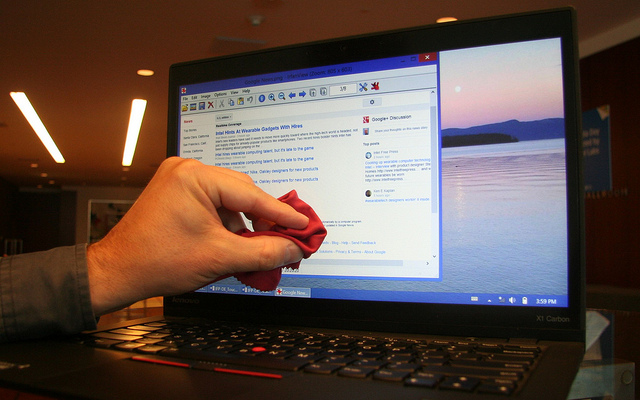
Apply glass or specialized screen cleaner on microfiber cloth and clean the monitor with gentle circular moves. In the end, wipe the monitor with a dry cloth in order to remove excess moisture.

Opening computer cabinet

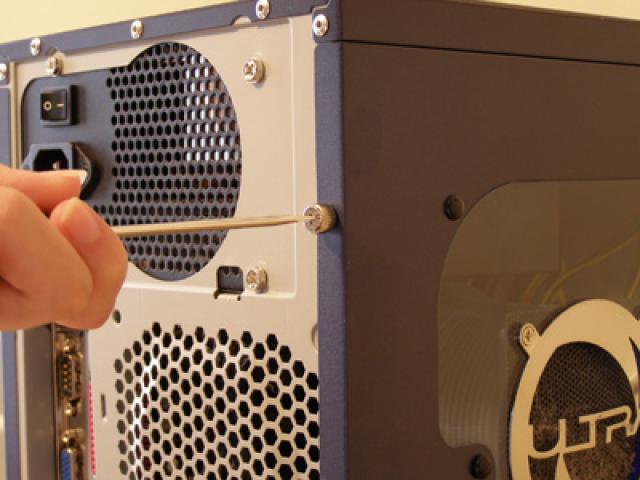
Computer cabinet should be opened with a screwdriver. Most desktop computers can be opened with 6-32 screwdrivers, while for some cabinets you will need an M3. Screws are usually on the back of the case. When you open the case, blow off the dust with compressed air, and then start disconnecting and unscrewing each computer component. Don’t forget to take a photo of your computer’s scheme and fold all the cables to make reconnecting them easier.

Fan

Fan is the first thing you should clean. You can clean it with compressed air, just make sure not to blow fan dust back to your computer cabinet. To clean the fan thoroughly, you need to unscrew it and clean it with cotton swab soaked in alcohol (some people use damp tooth brush for this task). When you’re reinstalling your fan, watch out for the sign that indicates which way the air is being pushed into the computer case.

Mother board

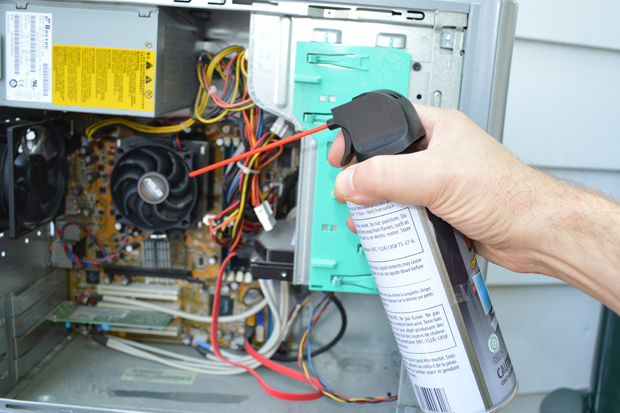
If you want to clean your motherboard just a bit, you should use compressed air can and simply blow off the dust. But, if you want your motherboard to be fully cleaned and shiny, remove each element from it (CPU, cards, RAM etc.) and clean it with a cotton swab. This kind of motherboard spring cleaning can be done once a year, and it will solve all of your mother board, CPU, RAM and GPU dust issues.

Processor

CPUs are wrapped in thermal paste in most computers, and there are two ways to clean them. You can simply blow the dust and thermal paste’s residual material off with a can of compressed air, or you can unscrew the processor and thoroughly clean its heatsink with alcohol applied on a cotton swab. Second option will leave you with a spotless processor, but you will need to apply a new layer of thermal paste, before attaching it back to the motherboard.

Desktop spring cleaning is very useful, not only for removing dust from your computer’s components, but also for conducting on the spot diagnostics that will determine which components and parts are ready for a refresh or a change. You should also use this opportunity to arrange your cables with zip ties, which will make your next computer cleaning much easier.

This article was written by Raul Harman, a KnowledgeBlog.Net Contributor; a Tech Geek and an Editor of Technivorz.
You can send us your tech related articles for publishing to attamah@knowledgeblog.net, and it will be published under Guest Posts. You can also send us Sponsored Posts for publishing via same email ID attamah@knowledgeblog.net. 
Read More »

Get Best Blogging Advice Here

You may have some familiarity with blogging already. Blogs are webpages composed for the purpose of getting your message out about life or the things you love doing with it. Blogs are more personal to people than a webpage and are one of the most popular forms of social media. Read on for some excellent information if you have an interest in blogging. If you are interested in blogging, but you don't particularly like to write, try starting a blog about one of your creative talents. You could try a photography blog and share your hobby with others. Or you may write poetry or music that you could post samples of. If people like what you have to offer, they will come back for more.

If you are starting your own blog, you probably won't have a multitude of readers and comments right away. You will have to search out people and show them you exist. Some ways to do this are with social networking, such as
Facebook and Twitter. Use these sites to communicate with people, not just to post links.
Everything you do can end up being the subject of a blog. Take notes when you are away from the computer, if you stumble across an idea that may translate into a post. You want to always keep your eyes open for subject ideas. Writing is the easy part, it's coming up with the initial concept that usually leads to writer's block.
Write posts that are not overly wordy or complicated. Your blog needs to be filled with information, but also be concise and readable. Most blog readers aren't looking for Pulitzer-winning prose or poetic descriptions of every detail of a topic. They want the whole pizza, not just the toppings!
Try asking readers for feedback. Be sure to interact with them. Don't assume that you know exactly what it is that your readers want from the blog, try asking them outright. This can be done in your comments, by creating a specific post for feedback by email, or social networks like Twitter. You could even use online communities.
The common feature of popular blogs is their ability to attract and hold the attention of readers. By following the tips presented here, you can learn to be a more interesting blogger and garner more readers. While most people maintain blogs for fun, it can make a lot of money. Whether your goals are more personal in nature or geared toward creating a blogging business, enjoy the time that you spend creating your digital journal!
Get Stock Market Tips On Whatsapp And Telegram On A Daily Basis, The Call Are 10% Intraday Only Another Great Thing About Supernsetips  Is That Our Traders Always Have The Full Confidence In Their Calls So You Will Trade With Us With Complete Confidence.

Read More »

How to Design a Professional Looking Blog with Ease

This summary is not available. Please click here to view the post.
Read More »

Tag Someone Not Your Friend on Facebook with Mobile Phone

It has come to my notice that so many Facebook users find it very difficult to tag someone (mention someone's name) not their friend in their posts or comments on Facebook using their mobile phones. On Facebook, when you tag someone (mention someone's name) in your comment or post, the person will be notified instantly by Facebook that you have mentioned his name in a comment or post. In most cases this happens when you want to draw the person's attention to a particular fact. For instance, if someone makes a negative comment on your post or on another person's post and you want to respond to that, it is expected that you tag the person (mention the person's name) so that he will know that you have responded to his comment, especially when the person is not the maker of the post but had just made comment. You can also use Facebook tagging to thank someone for a particular comment or gesture shown by the person.
In this post, I will show you how you can tag someone (mention someone's name) in your post or comment using your mobile phone, even if the person is not your friend on Facebook.
Follow the steps below to mention the name (tag) someone that is not your friend on Facebook using your mobile phone.
==> Click on the person's profile picture and open it as if you want to make comment on his profile picture. Pay a close attention on the attached pictures here for guide.
==> Click on the address bar and you will see the person's Facebook URL just like the one below; a very lengthy texts.
https://m.facebook.com/photo.php?fbid=1255339384495769&id=100000591581194&set=a.152494781446907.30354.100000591581194&refid=17
==> Carefully look at the texts and you will see a fifteen (15) digit number which is the person's Facebook Identity (I'd) number. You will find the I'd number in two places; the first one is after 'id=' while the second one is before '&refid=17' which are the last texts.
See below, both the first and the second as contained in my profile:
First: id=100000591581194
Second: 100000591581194&refid=17
==> Just at exactly where you want the name of the person to appear in your comment or post, type the 'at' symbol '@' followed by an open bracket '[' followed by the Facebook fifteen (15) digits I'd '100000591581194' followed by a colon ':' followed by zero '0' and close bracket ']'
Example: @[100000591581194:0]
Please take note of the exact open and close bracket as they are here.
Once you are done, post your comment or post and you will see the person's name appearing in your comment or post, even if the person is not your friend on Facebook.
Let me know if it has worked for you by dropping your comment below.
Read More »

Do This When Your Blackberry Phone Refuses to Browse

If you are a BlackBerry device user, you will notice that at times, even when there is network coverage on your BlackBerry phone it will refuse to browse the internet. This kind of experience can frustrate, especially if you are the type that is addicted to using BlackBerry phones like me. At times it may be displaying the ‘EDGE’ in small letters while in some cases, even when the ‘EDGE’ is still in capital letters, it will refuse to browse.
Photo Credit: US BlackBerry
Also, where you have 3G network coverage; the 3G network will show, but the BlackBerry logo beside it will not. At times, even when the 3G icon is showing together with the BlackBerry logo, your device will still not want to browse. If you are facing this kind of challenge on your BlackBerry device, please follow the steps below to solve the challenge.
 ==> On your screen find the icon called ‘settings’ as you can see it highlighted in blue on the screen shot below.

Photo Credit: Knowledgeblog.net
==> Click on the ‘settings’ icon to open it.
==> Scroll down to ‘device’ as you can see on the screen shot below.

==> Click on the ‘device’ icon to open it.
==> Scroll down to the last option ‘Advanced System Settings’.

==> Click on the ‘Advanced System Settings’.
==> Scroll to ‘Host Routing Table’.

==> Click on ‘Host Routing Table’
==> You will see ‘GPRS NG’ with some codes in bracket. (621)[62102530].
Photo Credit: KnowledgeBlog.Net
Note that these codes may vary according to the Global System for Mobile Communication (GSM) network you are using.
==> Press the BlackBerry logo on the left to see options.
BlackBerry Logo

==> Scroll to ‘Register Now’ to register your device to the network.
==> You will see a message that says ‘Registration Message Sent’.
If registered successfully, you will receive a notification telling you that ‘your handheld has been registered with the wireless network’.


Congratulations! You can now browse using your BlackBerry device.
Read More »

Get free updates delivered to your inbox
facebook twitter gplus pinterest rss